# 1.Introduction

# SIM-ON

#### **Platform Overview**

**SIM-ON** is a comprehensive platform designed to enhance the management of IoT devices, assets, and facilities. By integrating these functionalities into a single system, SIM-ON enables both organizations and individuals to optimize operations, improve efficiency, and reduce costs by providing a comprehensive platform for managing IoT devices, assets, and facilities. The platform is highly versatile and serves to a wide range of industries, including construction, manufacturing, and real estate as well as individual clients and everyday users.

![obraz.png](https://docs.sim-on.com/uploads/images/gallery/2024-08/scaled-1680-/zbgobraz.png)


<span style="color: rgb(53, 152, 219);">[**Learn about SIM-ON through our official DOCUMENTATION**](https://docs.sim-on.com/shelves)</span>

---

#### **Key Functionalities**

SIM-ON focuses on three main areas: **IoT Integration**, **Asset Management**, and **Facility Management**. Each area provides a set of tools and capabilities designed to improve various aspects of organizational operations.

  
![SIM-ON overview.png](https://docs.sim-on.com/uploads/images/gallery/2024-08/scaled-1680-/sim-on-overview.png)


---

#### **IoT Integration**

SIM-ON utilizes IoT technology to connect and manage smart devices and sensors in real-time. This integration allows organizations to monitor various aspects of their operations thanks to secure and effortless access to device data.


![dashboard.png](https://docs.sim-on.com/uploads/images/gallery/2024-07/scaled-1680-/dashboard.png)

- **Real-Time Data Monitoring**: SIM-ON collects data from connected IoT devices, enabling real-time monitoring of parameters such as environmental conditions and energy consumption.

![obraz.png](https://docs.sim-on.com/uploads/images/gallery/2024-08/scaled-1680-/9Ixobraz.png)

- **Sudden events notification**: The alert system notifies you of the activation of critical safety devices such as flood sensors or door openings
- **One tool, many integrations**: Thanks to integration with various standards, it is possible to create complex IoT scenarios using devices from different suppliers.


---

#### **Asset Management**

SIM-ON provides robust asset management tools that help organizations effectively manage and maintain their physical assets, such as machinery, vehicles, and equipment.

**Comprehensive database of information**: It consist of textual descriptions, active links, images in .jpg, .png formats, documents in .pdf, .xlsx, .docs, .pptx formats, and YouTube videos all stored together to provide complete and accessible product documentation.

![obraz.png](https://docs.sim-on.com/uploads/images/gallery/2024-08/scaled-1680-/sdYobraz.png)

- **Lifecycle Management**: The platform helps manage assets at every stage, from purchase to disposal, ensuring they are used efficiently and well-maintained.

![obraz.png](https://docs.sim-on.com/uploads/images/gallery/2024-08/scaled-1680-/PWbobraz.png)

- **Maintenance Automation**: Events linking to a property maintenance schedule can be assigned to the created data resource helping to prevent equipment failures and reducing repair costs.


---

#### **Facility Maintenance**

Facility management is simplified through SIM-ON’s digital tools, which help to manage buildings, spaces, and infrastructure more efficiently.

- **Space Optimization**: Provides insights into space utilization, allowing for better planning and optimization of available areas.
- **Energy Management**: Real-time monitoring and control of energy consumption help organizations reduce energy waste and promote sustainability.

![obraz.png](https://docs.sim-on.com/uploads/images/gallery/2024-08/scaled-1680-/Pdnobraz.png)

- **Ticket system**: With its help, you can mark any place in the 3D space, add a description, photos, and assign another user with access to this project. This creates a thread for information exchange and the creation or addition of a response results in a notification sent via email.

---

#### **What can SIM-ON offer you?**  


- **Efficiency and Productivity**: Combining IoT, asset, and facility management in one platform streamlines operations and enhances productivity.
- **Scalability**: The platform can be customized to fit various industry needs and scale with business growth - from private to enterprise users.
- **Data-Driven Insights**: Real-time data from different IoT devices provides valuable insights for strategic decision-making.

SIM-ON is a versatile platform that leverages IoT, asset, and facility management to provide organizations with a comprehensive solution for optimizing their operations. By integrating these functionalities into one system, SIM-ON can help you to reduce costs, improve efficiency, and drive growth - all while being easy to use and implement.

## Browse through showcase projects

<span style="color: rgb(126, 140, 141);">Experience the cutting-edge spatial Interface in showcase mode</span>

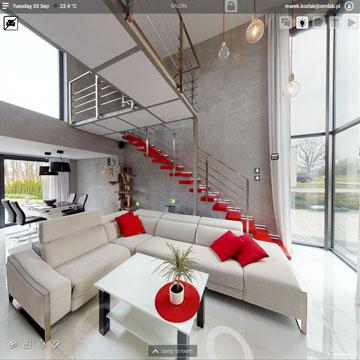
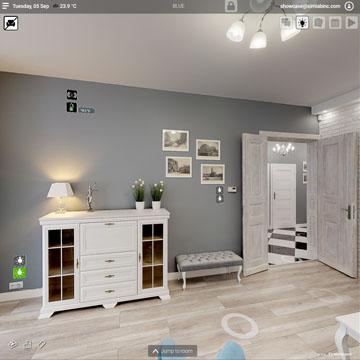
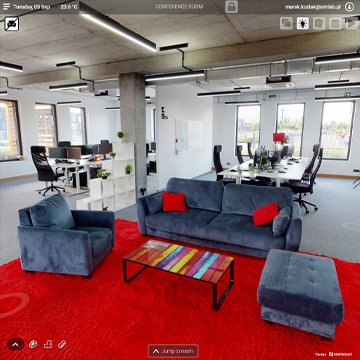
<table border="1" id="bkmrk-family-house-%C2%A0-legal" style="border-collapse: collapse; width: 100%; border-width: 1px; border-style: hidden;"><tbody><tr><td class="align-center" style="border-width: 1px;">##### Family house


##### [![Family house example.jpg](https://docs.sim-on.com/uploads/images/gallery/2024-07/scaled-1680-/family-house-example.jpg)](https://smarthome.simlab.pl/public/eyJwdWJsaWNMaW5rIjoiYTU0NzIyZWMtN2MyNC00OTI5LWQ4NDItMDhkYWE2YmQwOWE0IiwidXJsIjoiYXBhcnRtZW50P2lkPTBkZWU3ZmI3LTExNTgtNDdkZi1hZTc2LTE0YjQyNzk2Nzg0OCIsImV4cGlyZSI6IjIwMjItMTAtMDVUMTE6NTQ6NTYuNDQwOTkxNVoiLCJwbGhpZGVleGl0bGFiZWwiOnRydWUsInBsaGlkZW1lbnUiOnRydWV9)

</td><td class="align-center" style="border-width: 1px;">##### Legal office


##### [![legal office example.jpg](https://docs.sim-on.com/uploads/images/gallery/2024-07/scaled-1680-/legal-office-example.jpg)](https://app.sim-on.com/en/public/eyJwdWJsaWNMaW5rIjoiOTRjYTA4N2YtY2E4MC00ZmRlLWVhODMtMDhkYmUwNWFhNTJiIiwidXJsIjoiYXBhcnRtZW50P2lkPThiNGNjNDU4LTliZTAtNDc5NC05MTUyLTQ4OTBkYWYzMzlkYSIsImV4cGlyZSI6IjIwMjQtMDQtMDRUMDc6MTY6MzEuMjQ1MDI0NFoiLCJzdGFydGluZ1NjcmVlbiI6MSwiaW50ZXJpb3IiOm51bGwsInBsaGlkZWV4aXRsYWJlbCI6dHJ1ZSwicGxoaWRlbWVudSI6dHJ1ZX0=)

</td><td class="align-center" style="border-width: 1px;">##### Company headquarters 


##### [![office example.png](https://docs.sim-on.com/uploads/images/gallery/2024-07/scaled-1680-/office-example.png)](https://smarthome.simlab.pl/public/eyJwdWJsaWNMaW5rIjoiYjA3NjAyNWYtM2NhMy00MzNlLWZiNWYtMDhkOWEwNWVlZGI1IiwidXJsIjoiYXBhcnRtZW50P2lkPThhODNjZDcxLWI0MzUtNGQ4MS05YjdhLWNlOGQxODlhNTA1OCIsImV4cGlyZSI6IjIwMjEtMTEtMDVUMTM6MTk6NDIuNTg2MDQ5MloifQ==)

</td></tr></tbody></table>

<span style="color: rgb(53, 152, 219);">[**Learn how to use SIM-ON by following our official DOCUMENTATION**](https://docs.sim-on.com/shelves)</span>

# Features and Functionality

Our platform is founded on cutting-edge reality capture technology and adheres to the highest IoT and building automation standards.  
Although SIM-ON has a lot of functions and there are still many in development, main features of the SIM-ON solution.

![easy interface.png](https://docs.sim-on.com/uploads/images/gallery/2024-07/scaled-1680-/easy-interface.png)

- Consolidated vendor integration in a single hub
- Intuitive and user-friendly 3D interface
- Secure and effortless access to device data
- Visual representation of device activity and configuration
- Accurate spatial device mapping
- Comprehensive data compilation: devices, equipment, materials, gadgets
- Inclusion of photos, videos, and documents

![asset.png](https://docs.sim-on.com/uploads/images/gallery/2024-07/scaled-1680-/asset.png)

- Diverse categories for intuitive administration
- Scheduling and supervision of facility maintenance tasks
- Real-time 3D facility inspections
- Customizable activity timeline graphs
- Seamless integration with preferred news and widgets
- Hassle-free issue reporting via task manager

![timeline.png](https://docs.sim-on.com/uploads/images/gallery/2024-07/scaled-1680-/timeline.png)

See <span style="color: rgb(53, 152, 219);">[**Detailed Features List**](https://docs.sim-on.com/books/1introduction/page/detailed-features-list)</span> for comprehensive list of every functionality

# Detailed Features List

Comprehensive list of every SIM-ON feature and functionality available

### **Main Interface**

##### 3D virtual walk using Matterport technology

- IoT layer
- Scenes layer
- Assets layer
- Event side panel
- Tickets layer

##### 2D dashboard with view

- Devices
- Asstes
- Scenes

##### Personal preferences settings

- Error handling including showin/hiding modals
- Opening attachemnt in new tab (for Safari only)
- Reporting errors
- Units change
- Electricity consumption/price change
- Subscription plan information panel
- Subscription plan change panel

##### Multilanguage support

- English
- Spanish
- Japanese
- Polish
- German

##### Others

- <span data-sheets-root="1">Fullscreen view mode</span>
- <span data-sheets-root="1">My Spaces browser  
    </span>
- <span data-sheets-root="1">News</span>
- <span data-sheets-root="1">Add new space button</span>

### **IoT devices**

##### IoT devices 3D walk localization

##### Multiple vendors integration

- Samsung Smart Things using SmartThing and Aotec HUB
- FIBARO (Nice Smart Home) using Yubii and Home Center HUB
- KNX 3rd Party API using Schneider Electric Wiser for KNX
- Multi-protocol integration using NETx BMS platform

##### Supporting devices types

- Socket: on/off / power consumption (if avaible)
- Switch: on/off / power consumption (if avaible)
- Lamp: on/off / power consumption (if avaible)
- Temperature: monitor / set point
- Thermostat: set / work status
- Water leak: monitor / alarm
- Fire alarm: monitor / alarm
- Smoke detector: monitor / alarm
- Motion sensor: monitor / last detected
- Gas leak: monitor / alarm
- Heat detector: monitor / alarm
- Curtains: open/close/stop / % level
- Dimmer: on/off / % level
- RGBW dimmer: on/off / color / % level
- CO2 sensor: ppm monitor
- Seismometer: monitor
- Accelerometer: monitor
- Luxometer: LUX monitor

##### Device structure manager with functions

- show / hide device
- show / hide subdevice
- show / hide in 3D space
- show/hide in dasboard
- device &amp; subdevice name change
- subdevice icon change
- subdevice own photo upload
- category select
- room select
- deleting device

##### Others

- Different build-up icon picker for device
- Own photo as device widget
- Dievices status monitor (OK, disconected, blocked, etc.)
- IoT alert pop-ups with localization

### **Asset Management**

##### Asset management on 3D and dashboard

##### Asset information storage

- <span data-sheets-root="1">Name of asset</span>
- <span data-sheets-root="1">Free text</span>
- <span data-sheets-root="1">Photograps (jpg, jpeg, tiff, png, bmp)</span>
- <span data-sheets-root="1">Videos links player (YouTube, Vimeo)</span>
- <span data-sheets-root="1">Documents storage (Word, Excel, TXT, PowerPoint, PDF)</span>
- <span data-sheets-root="1">Event timeline</span>
- <span data-sheets-root="1">3D space location</span>
- <span data-sheets-root="1">Asset category</span>
- <span data-sheets-root="1">Asset icon</span>
- <span data-sheets-root="1">Room</span>

### **Event Timeline**

##### Possibility to add event timeline to every asset

- <span data-sheets-root="1">one time event</span>
- <span data-sheets-root="1">reccuring event (every day, week, month, year)</span>
- <span data-sheets-root="1">starting date</span>
- <span data-sheets-root="1">text decstription</span>

##### Summary event view on 3d side panel

### **Ticketing system**

##### 3D location on event

##### Event pop-up menu including for every event

- <span data-sheets-root="1">Name of event</span>
- <span data-sheets-root="1">Status (Open, In progress, closed)</span>
- <span data-sheets-root="1">Due date  
    - Stakeholder (Multiselect)</span>
- <span data-sheets-root="1">Desctription</span>
- <span data-sheets-root="1">Photo / documents add as a attachment to ticket</span>
- <span data-sheets-root="1">Comments with chat option</span>
- <span data-sheets-root="1">3D location</span>
- <span data-sheets-root="1">Created time</span>
- <span data-sheets-root="1">Author information</span>

##### Tickets notifications as a ticket icon label

##### E-mail notification to involved people

- <span data-sheets-root="1">Ticket created</span>
- <span data-sheets-root="1">Ticked status changed</span>
- <span data-sheets-root="1">Ticket new comment</span>
- <span data-sheets-root="1">Ticket edited</span>
- <span data-sheets-root="1">Ticket closed</span>
- <span data-sheets-root="1">Ticket deleted</span>

### **Scenes**

##### Build-in multi-provider scenes configurator

##### Manual and automatic triggers

##### Time delay

##### Devices status on scene start

##### Provider external scenes import mechanism (FIBARO/NICE)

##### External scenes as a scene part

##### 3D location for scene launch

### **Provider's Menu**

##### Connection status

##### Add / Remove connections

##### Log in / log out to providers

##### Importing devices

##### Device list with name, assigned room, provider, HUB name and current status

##### Filtering system

### **Space Settings**

##### General info, Space information view/edit

- <span data-sheets-root="1">Space name</span>
- <span data-sheets-root="1">Street</span>
- <span data-sheets-root="1">House number</span>
- <span data-sheets-root="1">Apartment number</span>
- <span data-sheets-root="1">Town</span>
- <span data-sheets-root="1">Region</span>
- <span data-sheets-root="1">ZIP code</span>
- <span data-sheets-root="1">Country</span>
- <span data-sheets-root="1">Cloud space limit usage</span>
- <span data-sheets-root="1">Matterport link</span>
- <span data-sheets-root="1">Mattertag importer</span>
- <span data-sheets-root="1">Space owner information</span>
- <span data-sheets-root="1">Space remove</span>

##### Rooms list with

- <span data-sheets-root="1">Devices</span>
- <span data-sheets-root="1">Asstes</span>
- <span data-sheets-root="1">Edit room name</span>
- <span data-sheets-root="1">Assign room color</span>
- <span data-sheets-root="1">Devices and assets ordering</span>

##### User management screen

- <span data-sheets-root="1">Adding / removing users</span>
- <span data-sheets-root="1">Adding / removing users assigned roles</span>

##### Role templates

- Adding new roles: 
    - Role name
    - Assigning permissions for general privileges, rooms, devices, assets, scenes and tickets
    - Roles with different permisions levels as view, edit, create, etc.
- Deleting roles

##### Acitivity log with information about recent activities with type, time, user and description

##### Filtering system

### **Interior Editor**

##### Model browser with build-up models library and filtering functions

##### Model database with different categories

##### Adding model to the 3D space

##### Model rotating and location change

##### Model removal

##### Layout manager

- <span data-sheets-root="1">Layout name</span>
- <span data-sheets-root="1">Layout show/hide elements</span>
- <span data-sheets-root="1">Layout choose</span>
- <span data-sheets-root="1">Layout removal</span>
- <span data-sheets-root="1">Layout duplicate</span>

### **Add New Space**

##### New space creator with stepper

##### Adding new space basic information

##### Matterport scan path

##### Stages importer

##### Importing room from provider or creating custom rooms

##### Provider log in window

##### Matterport link paste space with scan preview mode